Note · mcp
Letting my AI agent record its own demos
I wanted my AI agent to hand me a video of the feature it just built, without me opening OBS. A small MCP server records one app window and leaves out everything on top of it, and a desktop app shows when the AI is recording.
Every time my agent finishes a feature, I end up in the same ritual. Open OBS, frame the window, close Slack so nothing pops up in the corner, run the thing, hit record, and trim the start where I am still reaching for the mouse. All of that to prove that a few minutes of work did what it said.
I wanted the agent to do that part. It finishes, I say "record the app", and a clean video of that one window lands in a folder. No notification sliding in, no chat window dragged across the middle, none of the rest of my desktop.
That is screen-recorder-mcp, a small server any MCP client can call. It records one app window, a part of it, or a whole monitor. I have verified it on Windows; the macOS backend is written but experimental.
A screen recorder copies what is on the screen
That is the whole problem with handing a normal recorder to an agent. Whatever sits on top of the app at that moment ends up in the video. To get a clean take I would have to keep my desktop tidy while the agent works, and the agent cannot see my desktop. It cannot check that nothing is in front. Recording a region of the screen has the same flaw, because a region of the screen is not a window of the app.
So the question changed. Instead of asking the screen what it shows, ask the app what it looks like.
Ask the window, not the screen
Both operating systems can do that. Windows Graphics Capture and macOS ScreenCaptureKit read a window's own surface from the compositor, before it gets combined with everything else on screen. A window dragged over the app never reaches that surface.
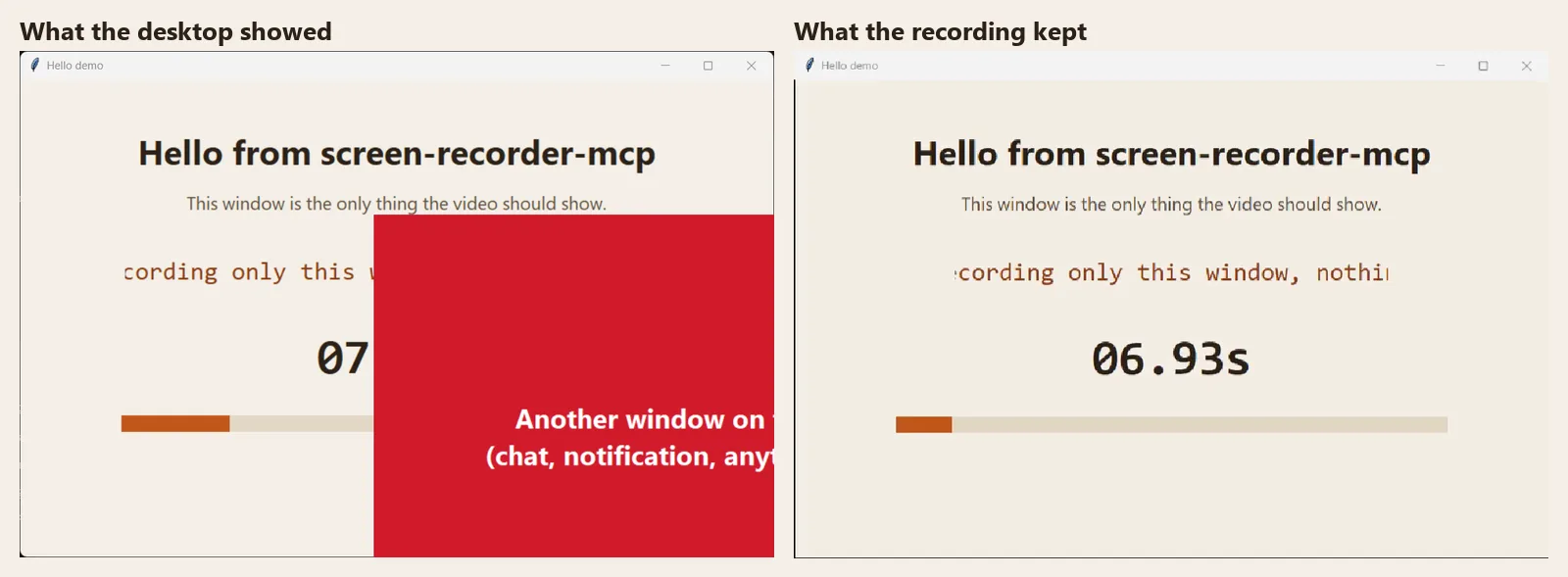
To check I was not fooling myself, the repo has a script that puts a red window on top of the app for three seconds while recording, then counts red pixels in the frames of the result, for the whole window and for a cropped part. On Windows it passes: the covering window never reaches the video.
The Windows side stands on the windows-capture package, which gave me the frames. What I added around it is the pacing, the crop, the audio and the MCP layer.
A still window still has to make a video

Getting frames led straight to the next surprise. Both capture APIs send a frame only when the window changes. Point them at a page that is not moving and a ten-second recording ends up a fraction of a second long.
The server keeps the latest frame and re-sends it on a fixed clock, 30 per second by default, so waiting counts as time. The result is a constant frame rate MP4 that plays at the speed things happened.
The agent asks, and you drag
Sometimes the whole window is too much. The server tells the agent to ask whether I want the full window or a part of it. If I want a part, an overlay opens over the app, I drag a rectangle and press Enter. Escape or a right click records everything.
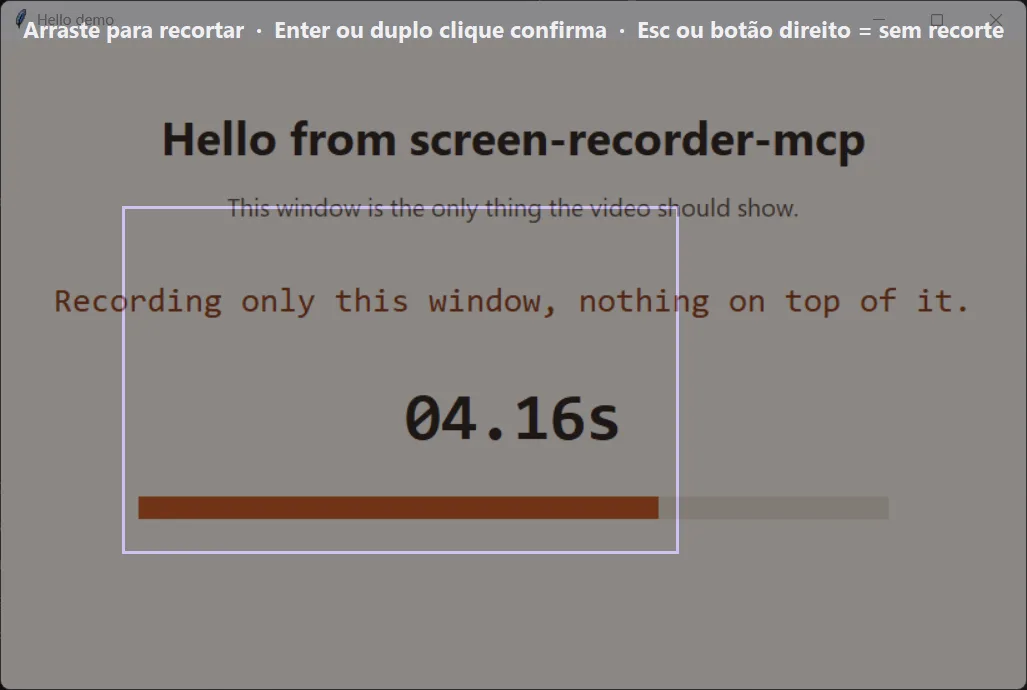
The overlay runs as its own process, and ffmpeg's output goes to a log file. In an MCP server that talks over stdio, standard output is the conversation. One stray print from a window toolkit and the client stops understanding the server, so nothing else is allowed to write there.
What using it feels like now
I install it once and the client lists eleven tools: finding windows, picking a region, starting, pausing, stopping, and a few for what comes after, like listing past recordings, trimming one and exporting a GIF. In practice I never call them. I say "record the Chrome window, just the left half", the agent finds the window, opens the overlay, starts, and when I say stop it answers with the path of the file.
A few choices that are easy to miss. Audio is off unless I ask for it, because a demo that quietly carries my music or my microphone is worse than a silent one. There is one recording at a time. A minimized window produces no frames, so the server says so instead of writing an empty file. Apps that block capture, like some DRM video players, come out black. If the GPU is busy, it reads the window on the CPU instead, so the recording still happens.
I want to see when the agent is recording
There was one thing I did not like about all this. An agent that can film my screen whenever it decides to is only comfortable if I can tell when it does. With the server alone I could not: no window, no light, just a file showing up later.
So I built a small desktop app and laid it out like the Windows Snipping Tool, because my hands already know that layout. It sits in the tray, and one shortcut opens a selection overlay with Rectangle, Window and Full screen, plus a 3, 5 or 10 second delay if I need time to get ready.
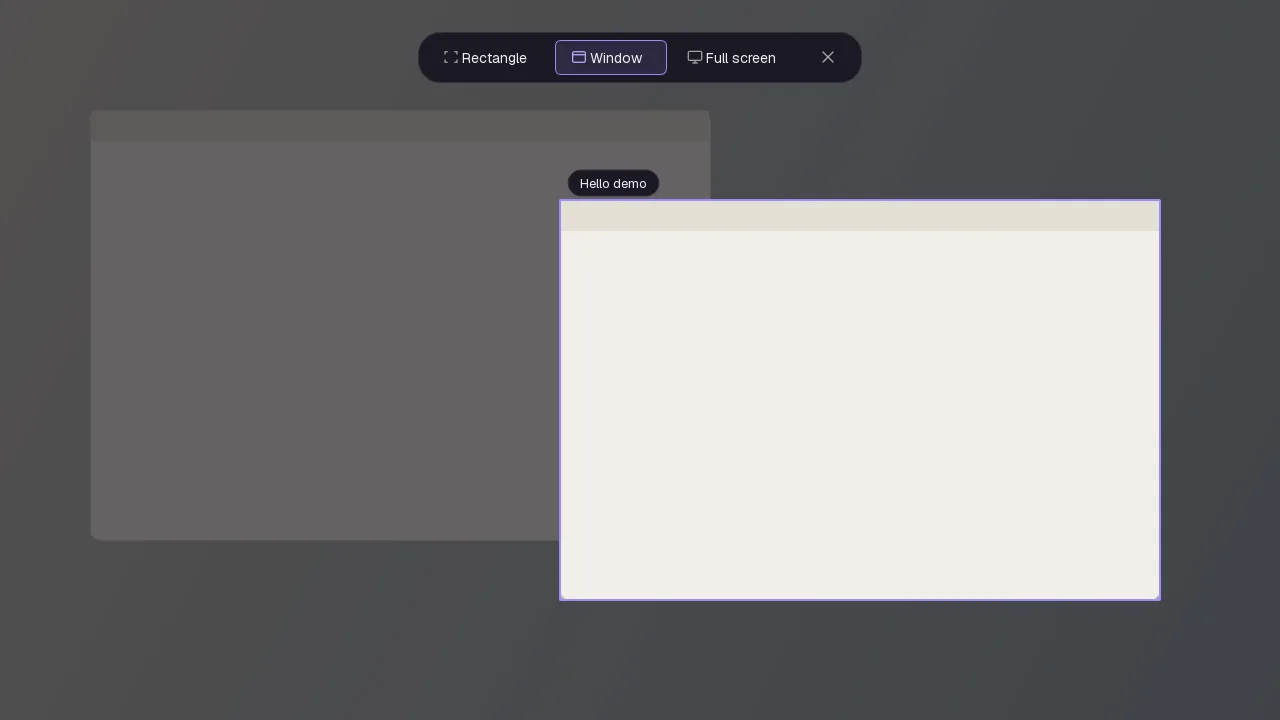
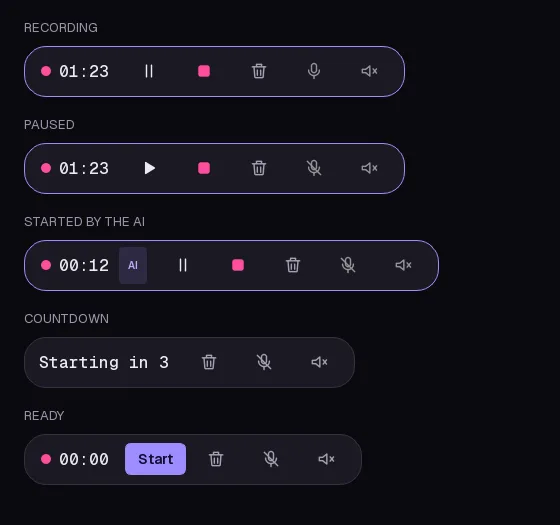
While it records, a bar docks at the top of the screen. I can drag it anywhere, it never appears in the video, and a border marks exactly what is being captured. When I stop, the recording is copied to the clipboard and opens in a player with trim and GIF export, and a recent-recordings menu keeps the last few one click away.
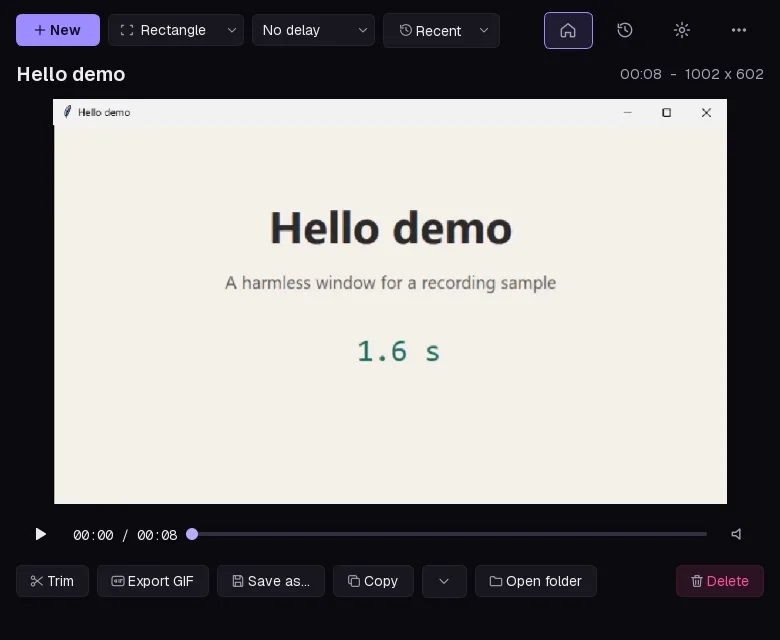
The part that matters for the agent is that the app and the MCP server do not record in two different ways. They share one recording service. When the app is open, the AI records through it, so the same bar shows up with an AI badge and I can stop it myself. It works the other way too: what I record by hand is visible to the agent, so I can say "make a GIF of my last recording" and it knows which one I mean. With the app closed, the server records on its own, as before. It is still one recording at a time, whoever starts it.
What is next
Linux is the obvious gap. The operating system specific code sits behind one interface, so a new backend is mostly a matter of writing that one piece. The more useful thing right now is a Mac: the verification script is in the repo, and the macOS path has never run on real hardware. If you have one, what does it print?
Something to add, or a part you disagree with? Write back.
Reply by email