Note · ios
How I used AI to control my Bluetti stations
One of my Bluetti power stations has no Wi-Fi. This is how I used AI coding agents to turn a PC at home and an iPhone app into a way to see and control it from anywhere, with an AC output that turns on only when the power goes out.
One of my two Bluetti power stations has no Wi-Fi. It speaks Bluetooth and nothing else, so the moment I leave the house it disappears. I cannot see its battery, I cannot see what it is powering, and I cannot switch anything on it.
I wanted that gone, and I wanted one more thing: its AC output should stay off while the grid is fine and turn on only when the power goes out.
This use case came from a night the power went out at home and I switched on the fan in my daughter’s room, running from the Bluetti, while she slept. But when the power came back, the air conditioner would turn on again and I would have the air conditioner and the fan running at the same time. My daughter would freeze.
The Bluetti app was not enough
The obvious answer is the vendor app. It works as long as I stand within a few metres of the station, because Bluetooth reaches no further. Away from home, there is nothing to open.
The automation was the bigger problem. Turning AC on when the grid drops needs something that watches the station all day and reacts within seconds, and a phone in my pocket cannot be that. Bluetooth adds one more rule: only one app can hold a station at a time, so whatever I built would have to share the link with the vendor app.
So the question was no longer which app to use. It was where the code that talks to the station should live.
A PC at home that talks for the phone
My computer is always on (it is plugged into the Bluetti itself), so I thought: I will make it the hub for my devices.
The PC still had to speak Bluetti, and I did not start from zero there. bluetti-monitor is an open-source Python client, reverse-engineered by its author, that talks to Bluetti stations over Bluetooth, including the encrypted ones. My hub is built on it. Everything around it is what Voltaris adds: a hub that serves both stations over a small HTTP API, an iPhone app, the automation and the notifications.
The phone reaches the hub through Tailscale, a private network that only my own devices join, so there is no login to build and nothing exposed to the internet. When I want the vendor app back, a button in my app, "Liberar para o app oficial", makes the hub let go of that station. A second button takes it again.
Reachable was half of it. The other half was what the hub should do once it could see the station.
How to know when the power went out
For "AC only during an outage" the hub has to know there is an outage, and the obvious number lies. A station reports how much power it takes from the grid, and that reads 0 W when the grid is down. It reads the same 0 W when the grid is fine, the battery is full and nothing is drawing power. Two different situations represented by the same state.
The station reports something else too: the voltage of its own mains input. That one is 0 V only when mains is gone, whether power is flowing or not. The page below shows 223 V and 60 Hz on the AC2A with the grid up.
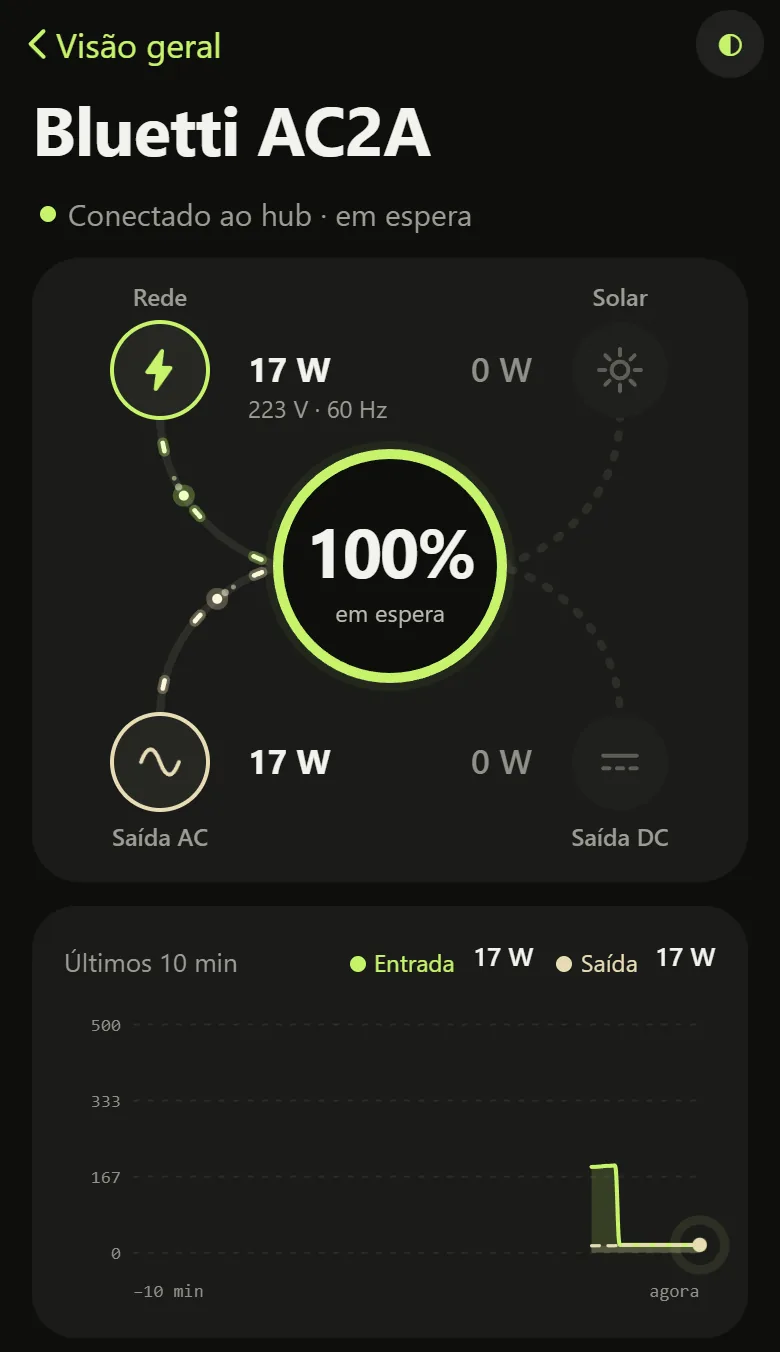
From that one number the rule is short. While the voltage is there, the hub keeps AC off. When it drops, the hub turns AC on. After the grid has been back for a while, it turns AC off again, but only if the automation was what turned it on. It is not a UPS: there is a gap of a few seconds, and a load that cannot take it belongs on the station's own UPS mode. The PC runs the rule itself, so it does not wait for the phone.
With the hub deciding on its own, the phone only had to show me what was happening.
An app to see it from anywhere
For the look, I had the agents draw three directions from colours sampled on real Dribbble shots, and I chose one: a near-black with lime for energy coming in and sand for energy going out.
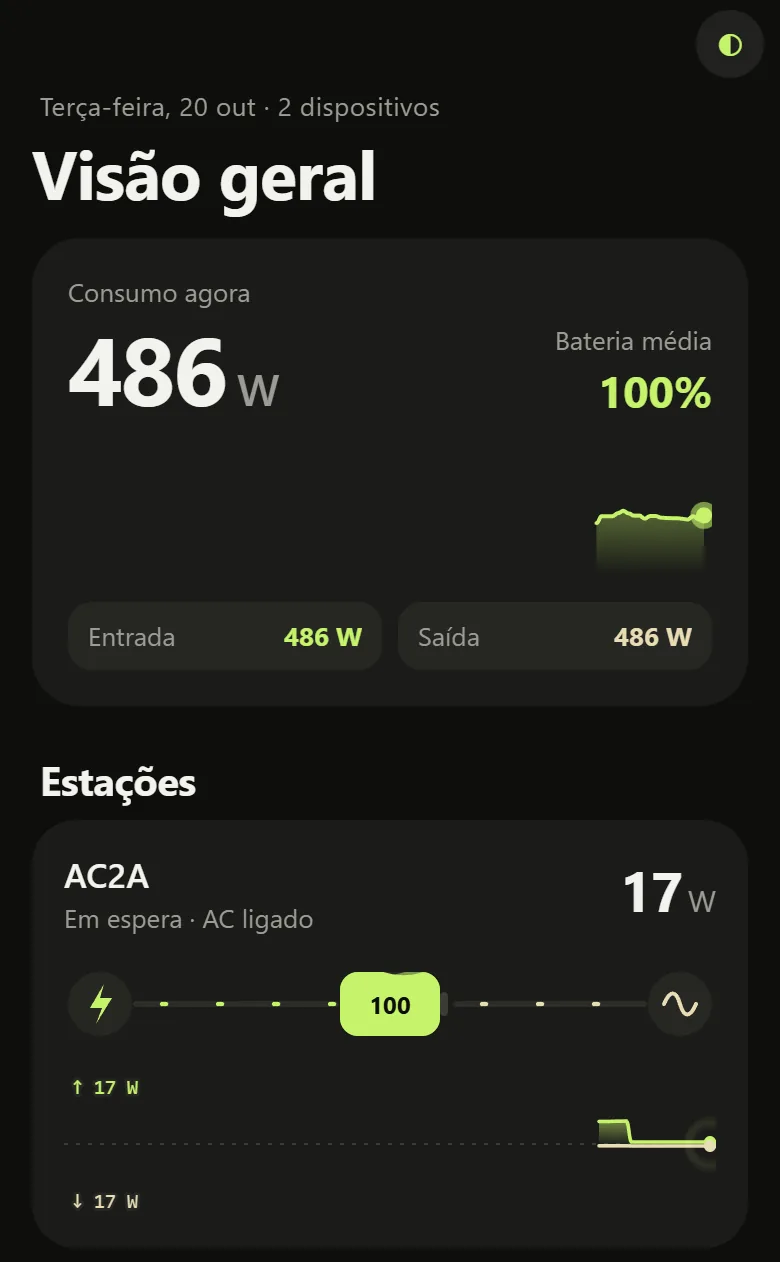
Open the app anywhere and the overview shows the consumption right now, the average battery and one card per station, each with its own energy flow.

A station's page opens the full flow, with grid, solar, battery and both outputs, the grid voltage and the last 10 minutes of power in and out.
Switching an output off, or turning the automation on or off, asks for a confirmation first, because cutting an output cuts whatever is plugged into it.
The hub also does the watching. It sends a push when the grid drops and another when it returns, with how long the cut lasted and how much energy the battery gave, and it sends one at 20% and 10% battery while discharging. Each station shows the time left on its battery, such as "acaba em ~1 h 20 min", and an outage log keeps every cut. If the hub itself goes quiet, a small program on a separate server notices within about 3 minutes and sends a push saying so.
How the work was split with the agents
That is what it does. How it got built is the other half of the title.
The app and the hub were not one long conversation. I split the work into three parallel batches against a written contract that fixed the boundary between the parts: one batch for the app shell, one for the animated visuals, and the theme, the API types and the config stayed with me. Each batch could change its own folder without breaking the others. My part was deciding what the stations should do, choosing the look and checking the result against my own stations. The agents' part was the code.
What is next
The same hub is ready for a Tuya door lock and bulbs, which I have not tried on the real devices. The outage log is still empty, so the whole chain has not met a real power cut yet. And if you have read grid voltage from another Bluetti model, I would like to know whether it sits on the same page of data.
Something to add, or a part you disagree with? Write back.
Reply by email